Integrating Humble Request into Your Creative and Professional Workflows
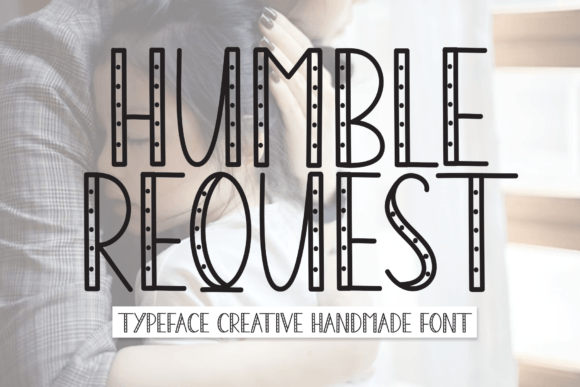
In the landscape of digital design and communication, typography is rarely just about aesthetics; it is a functional tool that dictates tone, readability, and user engagement. For professionals ranging from freelance graphic designers to small business owners managing their own branding, selecting the right typeface is a critical decision point in any project lifecycle. Humble Request emerges as a distinct option in this space, offering a sweet and friendly display font that balances creativity with versatility. Understanding how to effectively integrate this typeface into your broader workflow can enhance the quality of your deliverables, whether you are crafting wedding invitations, designing marketing cards, or adding a personal touch to digital assets.
Understanding the Role of Display Fonts in Project Planning
Before diving into specific applications, it is essential to position Humble Request within the context of design planning. Display fonts are typically used for headlines, titles, and short bursts of text where visual impact is prioritized over long-form readability. Unlike body text fonts, which require neutrality and high legibility at small sizes, a display font like Humble Request serves as the "voice" of the piece. It sets the emotional stage before the reader processes the actual content.
When initiating a new creative project, such as a branding package or an event invitation suite, the selection of the primary display font often happens during the conceptual phase. This is where you determine the personality of the project. Humble Request, with its handwritten aesthetic, signals approachability, warmth, and authenticity. Recognizing these traits early allows you to align other design elements—such as color palettes, imagery, and layout structures—to support this central theme. If the goal is to create a fun, inviting atmosphere, this font becomes a foundational asset rather than an afterthought.
Pre-Production: Asset Preparation and Compatibility
Successful implementation begins with proper preparation. Before integrating Humble Request into your design software, ensure that you have the correct file formats and licenses for your intended use. Whether you are working in Adobe Illustrator, Photoshop, InDesign, or web-based platforms like Canva, compatibility is key. Most modern design tools support standard OpenType (.otf) or TrueType (.ttf) files, which Humble Request typically provides.
During the pre-production phase, consider the following practical steps:
- Font Installation and Organization: Install the font family on your local machine and organize it within your font management system. If you use tools like Font Book (Mac) or NexusFont (Windows), tag Humble Request with keywords like "handwritten," "friendly," and "display" to streamline future retrieval.
- Licensing Verification: Confirm the license terms. For commercial projects, such as client work or products for sale, ensure you have the appropriate commercial license. This prevents legal complications later in the workflow.
- Pairing Strategy: Identify complementary body fonts. Since Humble Request is a display font, it should not be used for large blocks of text. Plan to pair it with a clean sans-serif or a highly readable serif font to maintain balance and hierarchy in your designs.
Execution: Applying Humble Request in Real-World Scenarios
Once the preparatory work is complete, the execution phase involves applying the font to specific deliverables. The versatility of Humble Request makes it suitable for a variety of contexts, but its effectiveness depends on how well it is integrated into the overall composition.
Wedding Invitations and Event Stationery
One of the most natural fits for Humble Request is in the realm of event stationery, particularly wedding invitations. The font’s sweet and friendly character aligns perfectly with the celebratory and intimate nature of such events. When designing invitation suites, use Humble Request for the names of the couple, the date, or key headings like "You're Invited." Avoid using it for the detailed logistics, such as directions or registry information, where clarity is paramount. Instead, pair it with a minimalist sans-serif to ensure that guests can easily read the essential details while still appreciating the artistic flair of the header.
Marketing Materials and Branding
For entrepreneurs and marketers, Humble Request can serve as a powerful tool for creating engaging social media graphics, promotional cards, and packaging labels. In these contexts, the font helps humanize the brand. A coffee shop owner, for example, might use Humble Request on chalkboard-style digital ads or loyalty cards to convey a cozy, community-focused vibe. When implementing this in marketing workflows, consistency is crucial. Establish guidelines for how and where the font appears to maintain brand recognition across different platforms.
Digital Content and Web Design
While primarily a display font, Humble Request can also enhance digital experiences when used sparingly. Bloggers and content creators might utilize it for featured image overlays, quote graphics, or section headers within long-form articles. However, web implementation requires additional technical consideration. Ensure that the font is optimized for web use, possibly converting it to WOFF or WOFF2 formats if self-hosting, to maintain fast load times and crisp rendering across various devices and browsers.
Workflow Integration and Quality Control
Integrating a new typeface into an established workflow requires attention to detail and quality control. As you move through the design process, regularly step back to assess the visual hierarchy. Is Humble Request drawing attention to the right elements? Is it competing with other design components, or is it harmonizing with them?
Consider the following observations for maintaining quality:
- Kerning and Spacing: Handwritten fonts often have unique spacing characteristics. Manually adjust kerning pairs if necessary to ensure that letters do not collide or appear too distant, especially in larger sizes.
- Contrast and Legibility: Test your designs against different backgrounds. Humble Request may perform differently on light versus dark backgrounds. Ensure sufficient contrast to maintain readability, particularly for users with visual impairments.
- Contextual Appropriateness: Continuously evaluate whether the tone of the font matches the message. While Humble Request is versatile, it may not be suitable for highly corporate, legal, or serious medical communications. Use judgment to determine if the "fun touch" it provides aligns with the project's objectives.
Long-Term Use and Asset Management
Beyond individual projects, consider how Humble Request fits into your long-term resource library. For freelancers and agencies, building a curated collection of reliable, versatile fonts can significantly speed up future workflows. By documenting successful pairings and use cases for Humble Request, you create a internal knowledge base that reduces decision fatigue in subsequent projects.
Furthermore, stay updated on any updates or additional weights released for the font family. Design trends evolve, and having a flexible toolkit allows you to adapt your offerings to client needs without constantly searching for new assets. Regularly review your portfolio to see how Humble Request has performed in past projects, noting client feedback and engagement metrics. This data-driven approach helps refine your understanding of when and how to deploy this font for maximum impact.
Conclusion: Enhancing Creativity Through Strategic Typography
Humble Request is more than just a visually appealing typeface; it is a strategic element in the design process. By understanding its characteristics, preparing adequately, and integrating it thoughtfully into your workflows, you can elevate the quality and effectiveness of your creative outputs. Whether you are designing wedding invitations, crafting marketing materials, or enhancing digital content, this font offers a reliable way to inject warmth and personality into your work. Embrace the practical aspects of typography selection, and let tools like Humble Request support your journey toward more engaging and professional design solutions.